

There’s nothing more frustrating than waiting for that last test or CI pipeline to finish, only for it to flake out. This decreases confidence in your test suite, increases spend on CI pipeline runtime, and decreases engineering happiness. Feature tests are especially prone to flakiness, as they rely on directly interacting with the application UI and browser. Adding JavaScript into the mix only increases failure likelihood. I’ve recently refactored a test suite to combat several known flaky patterns which I’ve outlined below.
Use Capybara Responsibly
When using any feature or acceptance testing framework, minimizing flakes is important to keeping your test suite reliable.
Capybara is smart enough to retry finding the link for a brief period of time before giving up and throwing an error.
The most important rule you can follow is to use Capybara as it was designed so that it properly waits for elements to be available. When done correctly, you can avoid introducing flaky strategies into your test suite. Capybara’s documentation along with Thoughtbot’s blog post give excellent guidance on the subject. As long as you follow these standard guidelines, Capybara is smart enough to wait for elements to be available without resorting to manual synchronization.
Here’s an AI generated representation of Capybara’s Syncrhonization mechanic from Deepwiki.
Phew, that Capybara Smells

Common flaky smells you may see include:
- Using
sleeporwait_untilto wait for elements to be available - Constructing
retryloops for inconsistent elements - Using retry mechanisms like
rspec-retryor Datadog retry - Executing JavaScript directly (sometimes unavoidable)
- Broadly scoped matchers instead of narrow, specific page sections
- Attempting to click hidden or background elements
- Areas of high interactivity and/or animation timing
These code smells indicate low confidence tests. If retry or sleep is necessary for a test to pass there is generally a better process or standard which will eliminate the need for these patches.
Wouldn’t it be nice if we could automatically detect these smells and make them easier to spot? That’s where Rubocop comes in.
sleep is a Test Smell
it 'checks a thing' do
  visit '/flaky_page'

  click_on 'A Slow Action'
  sleep 2

  click_on 'Another action'

  expect(page).to have_content('Static content before slow action')
end
The above test uses a manual sleep call to wait for a slow action to complete. The correct way to
approach this is to expect the exact side-effect from the slow action. The below showcases looking
for specific content that changes after the action completes instead of only checking for content
that remains unchanged.
it 'checks a thing' do
  visit '/flaky_page'

  click_on 'A Slow Action'
  expect(page).to have_content('Side effect from `Slow action`')

  click_on 'Another action'

  expect(page).to have_content('Side effect from `Another action`')
end
We can indicate to future engineers that sleep is a standard violation with the following custom
Rubocop rule. The def_node_matches is the magic which allows detection of the sleep call which
contains an integer amount.
require "rubocop/cop/base"

module RuboCop
  module CustomCops
    module Capybara
      class AvoidSleep < RuboCop::Cop::Base
        def_node_matcher :sleep_call?, <<~PATTERN
          (send nil? :sleep (int _))
        PATTERN

        def on_send(node)
          return unless sleep_call?(node)

          add_offense(
            node,
            message: <<~MESSAGE
              Avoid using `sleep` in feature specs. Prefer proper waiting mechanisms.
            MESSAGE
          )
        end
      end
    end
  end
end
In addition to the above custom rule you’ll want to add it to your rubocop.yml configuration file. This allows us to scope the check only to Feature tests.
require:
  - ./rubocop/custom_cops/capybara/avoid_sleep.rb

Capybara/AvoidSleep:
  Enabled: true
  Description: "Avoid using `sleep` in feature specs."
  Include:
    - "**/features/**/*_spec.rb"
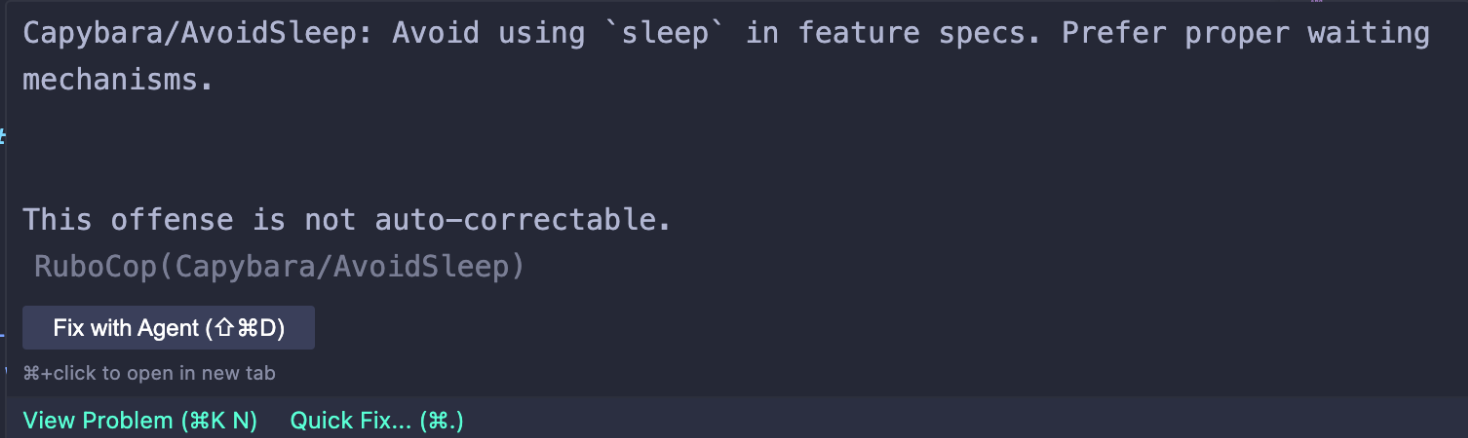
This will end up being picked up in your editor as the below is an example within Cursor.
retry is a Test Smell
it 'checks an indetermine thing' do
  visit '/flaky_page'

  click_on 'A Slow Action'

  with_retry do
    click_on 'Another action'
  end

  expect(page).to have_content('Static content before slow action')
end

def with_retry
  attempts = 0
  maximum_retries = 5

  begin
    yield
  rescue Capybara::Cuprite::ObsoleteNode, Ferrum::NodeNotFoundError
    attempts += 1

    raise if attempts >= maximum_retries

    retry
  end
end
The above attempts to perform click_on 'Another action' up to 5 times. It is retrying because it
isn’t confident that the previous click_on 'A Slow Action' is finished in time for the next click.
Like the above sleep example, the proper fix is to expect the end-state using standard Capybara
waiting techniques.
it 'checks a thing' do
  visit '/flaky_page'

  click_on 'A Slow Action'
  expect(page).to have_content('Side effect from `Slow action`')

  click_on 'Another action'

  expect(page).to have_content('Side effect from `Another action`')
end
Introducing a Rubocop rule here is event easier than sleep as there is an on_retry hook method. We
can simply designate retry as unnacceptable.
require "rubocop/cop/base"

module RuboCop
  module CustomCops
    module Capybara
      class AvoidRetry < RuboCop::Cop::Base
        def on_retry(node)
          add_offense(
            node,
            message: <<~MESSAGE
              Avoid using `retry` in feature specs. Prefer proper waiting mechanisms.
            MESSAGE
          )
        end
      end
    end
  end
end
# rubocop.yml
require:
  - ./rubocop/custom_cops/capybara/avoid_sleep.rb
  - ./rubocop/custom_cops/capybara/avoid_wait.rb

Capybara/AvoidSleep:
  Enabled: true
  Description: "Avoid using `sleep` in feature specs."
  Include:
    - "**/features/**/*_spec.rb"

Capybara/AvoidWait:
  Enabled: true
  Description: "Avoid using `wait: int` in feature specs."
  Include:
    - "**/features/**/*_spec.rb"
wait: x is a Test Smell
If you notice certain methods have explicit wait: x arguments that is a test smell. Capybara is
really good at waiting a default time for its built-in methods.
it 'checks a thing' do
  visit '/flaky_page'

  click_on 'A Slow Action'
  expect(page).to have_content('Side effect from `Slow action`', wait: 10)

  click_on 'Another action'

  expect(page).to have_content('Side effect from `Another action`')
end
These generally indicate there is an intermediate expectation missing to help ensure the element is available. I’m going to broken record here but the fix is largely the same with most flakes. Expect the next possible state to ensure proper waiting.
it 'checks a thing' do
  visit '/flaky_page'

  click_on 'A Slow Action'
  expect(page).to have_selector("#slowActionContainer div.expanded") # Wait for expansion to indicate content displayed
  expect(page).to have_content('Side effect from `Slow action`')

  click_on 'Another action'

  expect(page).to have_content('Side effect from `Another action`')
end
Wait is a bit more tricky to add a Rubocop rule. Because it isn’t a direct method call but an argument
passed to a Capybara matcher, we need to look for an argument pairing of wait and an integer. The
(pair (sym :wait) (int $_)) ensures we do just that and capture the integer for output messaging.
Additionally, we rely on the hook method on_pair since we aren’t sending a method call like we did
with sleep.
require "rubocop/cop/base"

module RuboCop
  module CustomCops
    module Capybara
      class AvoidWait < RuboCop::Cop::Base
        def_node_matcher :wait_pair?, <<~PATTERN
          (pair (sym :wait) (int $_))
        PATTERN

        def on_pair(node)
          wait_integer = wait_pair?(node)
          return unless wait_integer&.positive?

          add_offense(
            node,
            message: <<~MESSAGE
              Avoid using `wait: #{wait_integer}` in feature specs. Prefer proper waiting mechanisms.
            MESSAGE
          )
        end
      end
    end
  end
end
# rubocop.yml
require:
  - ./rubocop/custom_cops/capybara/avoid_sleep.rb
  - ./rubocop/custom_cops/capybara/avoid_wait.rb
  - ./rubocop/custom_cops/capybara/avoid_retry.rb

Capybara/AvoidSleep:
  Enabled: true
  Description: "Avoid using `sleep` in feature specs."
  Include:
    - "**/features/**/*_spec.rb"

Capybara/AvoidWait:
  Enabled: true
  Description: "Avoid using `wait: int` in feature specs."
  Include:
    - "**/features/**/*_spec.rb"

Capybara/AvoidRetry:
  Enabled: true
  Description: "Avoid using `retry` in feature specs."
  Include:
    - "**/features/**/*_spec.rb"
Strategies for complex flakes
All of the below strategies should be considered as what to try if standard Capybara expectations and matcher waiting isn’t sufficient. These will add some overhead to lock in consistent test suite results but rely on strategic workarounds.
A consistent test suite is a confident test suite
Animations with duration are flaky
Timing is everything for feature tests. Animations notoriously are plaqued by flakes. Most of the time using standard Capybara waiting techniques as mentioned above is the best approach. One solution I’ve found helpful is to instrument the animation lifecycle.
Instrumentation can be done by adding event handlers to events like: transitionend and transitionstart.
These in turn set the current state of animation which you can rely on for expectations.
connect() {
  this.containerTarget.addEventListener(
    "transitionend",
    this.onTransitionEnd,
  );
  this.containerTarget.addEventListener(
    "transitionstart",
    this.onTransitionStart,
  );
}

onTransitionStart = (event) => {
  if (event.propertyName === "translate") {
    this.transitionStateValue = "transitioning"; // Indicates state of change
  }
};

onTransitionEnd = (event) => {
  if (event.propertyName === "translate") {
    this.transitionStateValue = "idle"; // Indicates stability
  }
};

disconnect() {
  this.containerTarget.removeEventListener(
  "transitionend",
  this.onTransitionEnd,
);
this.containerTarget.removeEventListener(
  "transitionstart",
  this.onTransitionStart,
);
}
The above gives a Stimulus.js example of setting a state of idle or transitioning to the current
DOM element. From this you can expect an animation heavy element using such a technique to be done
transitioning when its state reaches idle
expect(page).to have_selector("[data-transition-state-value='idle']")
Element clicking based on position is flaky
Much like the animation timing example, sometimes elements are hidden, overlaid, or in the background. This can make them unclickable until a request has finished or something like a popup has closed. This is because the calculated location to click at changes or is invalid for the final element’s location.
This example is for the Cuprite headless browser. A clickable link which is non-deterministically hidden behind other elements based on page timing could fall victim to returning a flaky result.
module CupriteHelpers
  def click_with_cuprite_fallback(text)
    link = find("a", text: text, exact_text: true)
    link.click
  rescue Capybara::Cuprite::MouseEventFailed => e
    puts "Capybara::Cuprite::MouseEventFailed: Error clicking on link: #{text}. Falling back to " \
         "trigger('click'). Error: #{e.message}"
    link.trigger("click")
  end
end

# Some test
click_with_cuprite_fallback("Call to action link")
What the above does is attempt the standard link click by default. If there is a failure, it then
falls back to using .trigger(click). Now be aware that this method isn’t available in all
headless browsers. The difference between link.click and link.trigger("click") is that link.click
scrolls the browser and interacts with the page closer to how the end-user would. link.trigger("click")
is akin to executing JavaScript to directly click the element.
Fresh and clean

With that we’ve guarded against some of the worst offenders: sleep, retry, and wait. We’ve also provided necessary workarounds for animations and element click positioning when other strategies aren’t sufficient.
Got another technique or strategy you use? Drop me a comment below.
Ruby Enumerable Gonna Show You How It's Done, Done, Done
Join the conversation